
Description
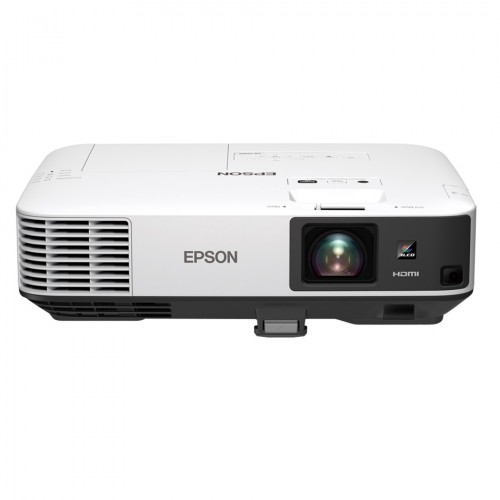
Epson CB-2065 5500 Lumens 3LCD XGA Projector
Bring sharp images and bright colours to any meeting room with our super-bright new business projector, which offers an outstanding brightness level of 5,500 lumens and XGA resolution. The CB-2065 is designed to project a scalable image up to a massive 300 inches, and offers stream and share wireless connectivity using Epson’s Multi-PC projection or the Epson iProjection App. Epson’s 3LCD technology ensures high-quality content has more vivid colours and brighter images. HDMI connectivity guarantees sharper and clearer content, even at the maximum image size of 300 inches. The CB-2065 offers stream and share wireless LAN connectivity using Epson’s Multi-PC projection or our Epson iProjection App and two HDMI connections. Setup is easy too, thanks to features including auto-power-on, focus help, keystone correction and screen fit – allowing the user to deliver presentations quickly and effectively. Project for longer with improved reliability and a longer lamp life of up to 10,000 hours in eco mode. The home screen offers quick and easy access to a variety of useful functions, such as connection sources. Wireless connections can also be made easily using the information on screen. Change slides by simply moving your hand, making even smarter presentations a reality by liberating the user from their remote control or mouse. The Multi-PC projection software bundled with the CB-2065 makes it possible to connect up to 50 computers and partition the screen for split screen projection capability – offering far better cost-effectiveness and flexibility than a flat-panel display.
Epson CB-2065 XGA 5500 lumens 3LCD Projector
A SIMPLE GESTURE FOR GREATER CONVENIENCE
Leave the lights on and take control whether in the meeting room or classroom. Epson’s CB-2065 projector is engineered to shine outstandingly even in well-lit environments to enrich your presentation experience. This projector allows a wide variety of input methods from a wide-range of devices. Your brilliant presentations are made even better and more convenient with the new gesture-control function that allows you to navigate between your slides without the use of a peripheral device.
- XGA Resolution
- White and Colour Light Output at 5,500 lumens
- Gesture Presenter
- Multi-PC Projection
- 2 x HDMI
- Split Screen
Brilliant Presentations
Bright and Light
Even though its light weight and compact size enable it to be carried from room to room, the projector is capable of highly visible images thanks to its high brightness and superior 15,000:1 contrast ratio. Room lights don’t have to be dimmed to see bright and clear projected images, allowing meeting participants to concentrate better for improved meeting productivity.
High Quality and Cost-effective Connectivity
Full Compatibility
Advanced connectivity features mean convenient and hassle-free projections of your presentations. With a wide-ranging interface, the projector not only corresponds with multiple conventional analogue sources, they are also compatible with HDMI input. In addition, one of the two HDMI input terminals is MHL-enabled for the mirroring of Android mobile devices.
Multi-PC Projection
With the control of a host PC, up to 50 terminals can be connected via the multi-PC projection from a single projector. The host PC acts as a moderator, selecting media from up to 4 terminals to be projected simultaneously. With the moderator function, you can maintain control and prevent tampering with what’s projected on screen.
Split Screen
Split screen allows inputs from two separate sources to be displayed side by side on the same screen. In a video conference, for example, images of presentation materials and remote participants can be shown simultaneously.
Real-Time Auto V&H Keystone Correction
The projector is equipped with built-in camera to provide advanced, auto vertical and horizontal keystone correction. With this correction feature, you can conveniently position the projector anywhere in the room. Simply turn on the power and direct the projector towards the screen or wall, and the image will be automatically corrected in no time.
Epson Projector Management
With Epson’s network monitoring and control software, you can see from a single PC which projector is available and whether they are running efficiently – even across the biggest networks. You can access, configure and control all your projectors remotely, as well as receive instant email alerts for pre-defined critical indicators such as non-functioning devices or overheating lamps. Each projector’s IP address can also be accessed remotely via LAN connection.
Wireless Transmission
Enjoy enhanced connectivity and flexibility with Wi-Fi connectivity*. Easily share and transmit images, documents and files from your smart devices using the “Epson iProjection” application for smooth and smart projections. And with an additional attachment piece holding the wireless LAN adaptor in place, your transmissions will never be interrupted.
Home Screen
View and access your most frequently used functions immediately on the home screen. See all source information at a glance, no matter what the source input. With all the information you need right there on the home screen, wireless connections have never been easier.
Auto Power On
With the auto power on function, projection starts automatically once a projection signal is detected via VGA cable, HDMI cable and USB port. This provides an easy and hassle-free presentation.
Scheduler Function
Reduce power consumption and do your part for the environment with the schedule projector action. With this function, you can programme the projector to automatically turn
Specifications
Projection Technology:
RGB liquid crystal shutter projection system (3LCD)
Brightness:
White Light Output (Normal/Eco):
5,500lm / 3,800lm
Colour Light Output:
5,500lm
Connectivity:
Network:
Wired LAN: RJ45 x 1
Wireless: Optional
Analog Input:
D-Sub 15Pin: 2 (1 Blue, 1 Black)
Composite: 1
Digital Input:
HDMI: 2
Output Terminal:
D-Sub 15Pin: 1 (Black)
Audio Input:
RCA (White/Red): 1
Stereo Mini Jack: 2
Audio Output:
Stereo Mini Jack: 1
Control I/O:
RS-232C: D-Sub 9pin x 1
Others:
USB Type A: 1 (for USB Memory, Firmware Update, Copy OSD Settings)
USB Type B: 1 (for USB Display, Mouse, K/B, Control, Firmware Update, Copy OSD Settings)
Contrast Ratio:
15,000:1
LCD:
Size: 0.63” (D10,2 Fine)
Native Resolution: XGA (1024 x 768)
Lamp:
Type: Lamp
Life (Normal / Eco)*1: 5,000 / 10,000 hours
Weight:
Approx. 4.4kg
Dimension Excluding Feet (W x H x D):
377 x 101 x 219 mm
The Epson CB-2065 projector is a high-performance & top-notch device tailored for professional presentations, business meetings, and educational needs. With a huge 5500 lumens brightness and an XGA (1024 x 768) native high-resolution display, this projector ensures clear images and video even in full-lighting rooms. Epson CB-2065 is built with versatile connectivity options, HDMI, VGA, and USB ports, it can integrate with various devices for hassle-free use. The changeable lens features and keystone correction give flexibility and convenience of usage. Network connectivity also enhances flexibility and ease of use. Whether you’re conducting meetings or delivering important presentations, the Epson CB-2065 is the best choice. The Epson CB-2065 is built for official meetings but it can be used in the classroom as well. Here’s a general discussion of what you need to look at buying time and why you need to buy this projector:
Brightness: The Epson CB-2065 is known for its high brightness, which is essential for clear and realistic projections, especially in bright environments or large rooms. If you plan to use the projector in such conditions, brightness becomes crucial.
Resolution: Check the projector’s resolution to ensure it meets your needs. Higher resolutions always provide sharper image & video quality. The CB-2065 has an XGA (1024 x 768) resolution, and you should consider if it aligns with your expectations for image quality.
Connectivity: Look at the available ports and connectivity options on the projector while buying a projector. Ensure it has the inputs you need to connect your devices, such as laptops, DVD players, or gaming consoles. Epson EB-2065 has all the ports that you need to connect with your streaming device.
Projection Technology: The Epson CB-2065 uses LCD(updated 3LCD|) technology, known for producing real colors. Consider the advantages of the specific projection technology used and how it aligns with your preferences.
Throw Distance and Lens Zoom: Evaluate the projector’s throw distance capabilities and lens zoom features. These factors determine how far the projector needs to be from the screen and how adjustable the image size is.
Durability and Build Quality: Check the build quality and durability of the projector, especially if you plan to use it frequently or in different locations. A well-built projector is likely to have a longer lifespan. Epson EB-2065 is a well-built device and handy to use for its compact design.
Additional Features: Check for any additional features that might be relevant to your needs. This could include built-in speakers, keystone correction, 3D capability, or wireless connectivity options.
Brand Reputation: Epson is a well-known brand in the projector industry. When buying a projector, consider the brand’s reputation as well, and read reviews of other users to get an idea of this particular projector model.
Price: Compare the price of the Epson EB-2065 with other projectors in the same category. Ensure that you are getting good value for the features and performance offered.
With remembering all the necessary facts for buying projectors and features, the Epson CB-2065 is the perfect match for you. Remember that specific features can vary on production batch, and it’s essential to check the latest product specifications for Epson’s official website. Also, talk with the seller about all the specifications of that model. Check some other website reviews for the most accurate and up-to-date information on the Epson CB-2065 projector. Ultimately, the decision to buy the Epson CB-2065 or any other model depends on your specific requirements and how well the projector meets those needs. Always consider the context in which you plan to use the projector.


Reviews
There are no reviews yet.